Apache Kerberos Integration
| Version | Date | Notes | By |
|---|---|---|---|
| 0.1 | 2020-10-19 | Initial release | jfm |
Objective
Integrate Apache with Kerberos so that it is possible to get the user that is currently logged in.
The user will be availble on PHP as $_SERVER['REMOTE_USER'] or $_SERVER['REDIRECT_REMOTE_USER'] depending if the URL is being redirected from a Rewrite (or other?)
Information for the examples:
Domain: PANDA.LOCAL
User: PANDA\apachekerb
Pass: apachekerb_pass
URL: sgi-back.wedev
Preparing Active Directory
- Create a new Active Directory user that will be used for the integration. In this we will be using the user PANDA\apachekerb with password apachekerb_pass. Check option to never exprire password
- Create a keytab file using the ktpass command
ktpass -princ HTTP/sgi-back@PANDA.LOCAL -mapuser PANDA\apachekerb -crypto ALL -ptype KRB5_NT_PRINCIPAL -mapop set -pass apachekerb_pass -out krb5.keytab- Next we need to associate the fqdn with the user using the setspn command.
setspn -s HTTP/sgi-back-back.wedev panda\apachekerb```
setspn -s HTTP/sgi-back.wedev@PANDA.LOCAL panda\apachekerb
Linux
- Install the Kerberos cliente:
sudo apt-get install krb5-user - Configure the file
vi /etc/krb5.conf
[libdefaults]
        default_realm = PANDA.LOCAL
        fcc-mit-ticketflags = true

[realms]
        PANDA.LOCAL = {
                kdc = 192.168.10.100
                admin_server = 192.168.10.100
        }

[domain_realm]
panda.local = PANDA.LOCAL- Enable Apache kerb an7d headers module:
sudo a2enmod auth_kerb headers - Add the necessary configuration to apache on a Location or Directory
AuthName "AD"
AuthType Kerberos
KrbAuthRealms PANDA.LOCAL
KrbServiceName HTTP/sgi-back.wedev
Krb5Keytab /etc/apache2/krb5.keytab
KrbMethodNegotiate on
KrbMethodK5Passwd on
KrbAuthoritative on
KrbSaveCredentials On
Require valid-user- Add the following configuration to the VirtualHost:
Header set Access-Control-Allow-Credentials "true"
Advanced Example:
In this case we only ask for a valid-user on requests made do api/login and on REQUESTS that are not OPTIONS or GET
<Directory /var/www/sgi-back.wedev/public>
    AuthName "AD"
    AuthType Kerberos
    KrbAuthRealms PANDA.LOCAL
    KrbServiceName HTTP/sgi-back.wedev
    Krb5Keytab /etc/apache2/sgsipdkerb.keytab
    KrbMethodNegotiate on
    KrbMethodK5Passwd on
    KrbAuthoritative on
    KrbSaveCredentials On

    SetEnvIf Request_URI .* noauth
    SetEnvIf Request_URI /api/login !noauth

    <LimitExcept OPTIONS GET>
        <IfModule mod_authz_core.c>
            <RequireAny>
                Require env noauth
                Require valid-user
           </RequireAny>
       </IfModule>

       <IfModule !mod_authz_core.c>
           Order Deny,Allow
           Deny from all
           Satisfy any
           Require valid-user
           Allow from env=noauth
       </IfModule>
    </LimitExcept>
</Directory>
Auto Login
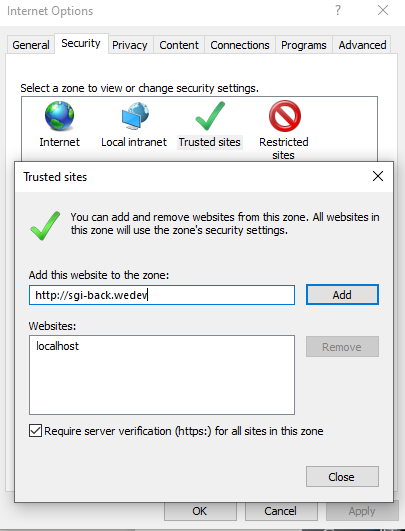
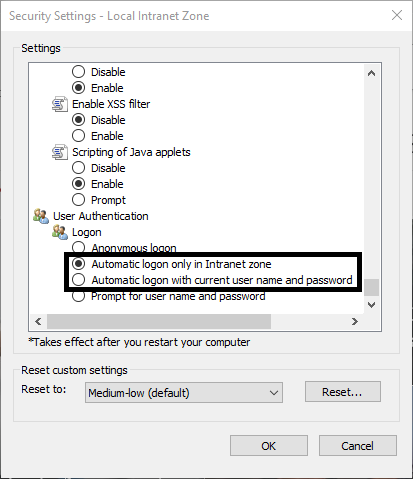
For browser to Autologin with their authenticated AD user, you need to add the URL in Local Intranet or Trusted Sites on the internet security options And guarantee that the option Automatic logon only in Intranet or Automatic logon with current user name and password is active
Found errors? Think you can improve this documentation? Simply click the Edit link at the top of the page, and then the icon on Github to make your changes.