Configuring Gitlab for CI / CD
| Version | Date | Notes | By |
|---|---|---|---|
| 0.3 | 2017-11-30 | Added setting github/satis authentication on composer | jfm |
| 0.2 | 2017-11-03 | Added setting github authentication | jfm |
| 0.1 | 2017-10-30 | Initial release | jfm |
The .gitlab-ci.yml file
The first step to automate the project is to add a .gitlab-ci.yml file to the repository root. The .gitlab-ci.yml must contain a set of jobs that defines what should be run when the automation process is triggered.
The structure of the file is documented here: https://docs.gitlab.com/ee/ci/yaml/#gitlab-ci-yml
Basically every job must contain a script clause folowed by the commands we whant to execute
dependencies:
  - copy .env.example .env
  - composer install
dependencies is the name of the job the rest are commands/scripts that must be run on the target server.
There are a lot of clauses we can use to help us configure our .gitlab-ci.yml file, whan it all depends on what we are trying to achive.
Following is small explained example:
stages:
  - dependencies
  - build
  - deploy

dependencies:
  stage: dependencies
  script:
  - copy .env.azure .env
  - copy laravel-echo-server.azure.json laravel-echo-server.json
  - composer install
  tags:
  - AzureWinTestWebServer
  when: manual

build:windows2016:
  stage: build
  variables:
    GIT_STRATEGY: none
  script:
  - php artisan key:generate --force
  - php artisan recreate-sqlsrv-db
  - php artisan migrate --seed --force
  tags:
  - AzureWinTestWebServer

deploy:windows2016:
  stage: deploy
  variables:
    GIT_STRATEGY: none
  script:
  - nssm stop laravel-queue-work
  - nssm stop laravel-echo-server
  - Stop-Website -Name "sgiv10test-back.wemake.pt"
  - Remove-Item C:\inetpub\wwwroot\backend_deploy -Recurse -ErrorAction Ignore
  - New-Item -ItemType directory -Path C:\inetpub\wwwroot\backend_deploy
  - Copy-Item * C:\inetpub\wwwroot\backend_deploy
  - Remove-Item C:\inetpub\wwwroot\backend_old -Recurse -ErrorAction Ignore
  - Move-Item C:\inetpub\wwwroot\backend C:\inetpub\wwwroot\backend_old
  - Move-Item C:\inetpub\wwwroot\backend_deploy C:\inetpub\wwwroot\backend
  - Start-Website -Name "sgiv10test-back.wemake.pt"
  - nssm start laravel-queue-work
  - nssm start laravel-echo-server
  tags:
- AzureWinTestWebServer| Clause | Description |
|---|---|
| stages | Used to define stages that can be used by jobs and the order they are executed. Basicaly on every job we can define the stage it belongs, so that jobs can be executed in order. |
| dependencies | This a job name dependencies, after this we can define some configuration and what we whant the job to do. |
| stage | The stage the job belongs |
| script | After the script cluase you must define the set of commands to run |
| tags | Defines that you whant the Runner with this tag to run this job |
| variables | You can add variable or set values to Gitlab variable like GIT_STRATEGY |
| GIT_STRATEGY | Tells the runner what type of strategy should use to update the project, possible values are clone, fetch or none |
By default every job that is supposed tu run, is executed automatically when the repository changes, however you can create manual jobs, by using the when clause with the values manual
dependencies:
  stage: dependencies
  script:
  - copy .env.azure .env
  - copy laravel-echo-server.azure.json laravel-echo-server.json
  - composer install
  tags:
  - AzureWinTestWebServer
  when: manual
Runners
The jobs are executed by the runners. The runners picks every job that is supposed to run and executes whats defined on the .gitlab-ci.yml
A runner can be installed on any machine, usually its not recomended to install the runners on the gitlab server.
To install a runner you can follow the instructions here: http://docs.gitlab.com/runner/install/
During the instalation instruction you have to register the runner by answering some questions:
Please enter the gitlab-ci coordinator URL (e.g. https://gitlab.com )
This is the URL to our gitlab instalation: https://gitlab.wemake.pt
Please enter the gitlab-ci token for this runner
Although the runner can be shared on multiple project, during the registration we still have to enter a token of a project for the runner. The token is available on the menu option Settings > CI / CD of the project
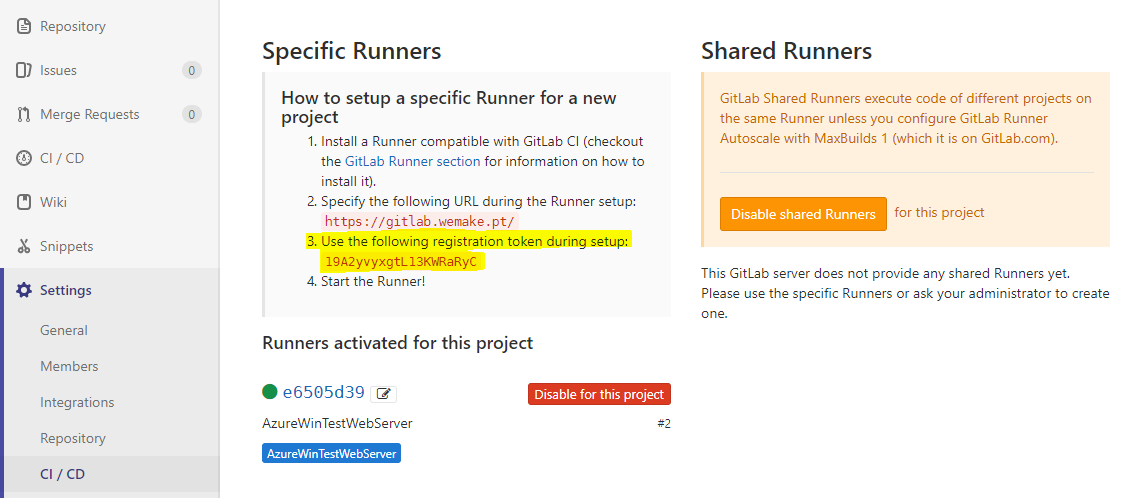
Please enter the gitlab-ci description for this runner
This is used to describe the use of this runner. Example: AzureWinTestServer or WeMakeUbuntuTestServer
Please enter the gitlab-ci tags for this runner (comma separated):
This is very important, the ideia is to define some tags that will trigger this runner. Since the project can only have one .gitlab-ci.yml but can be configure to be executed on several machine, we can limit what each runnner executes.
Example: AzureWinTestServer, WinTestServer
This means that every job that uses the tab AzureWinTestServer or WinTestServer will be executed by this runner.
Whether to run untagged jobs [true/false]:
Choose whether the Runner should pick up jobs that do not have tags.
Whether to lock Runner to current project [true/false]:
Choose whether to lock the Runner to the current project. Usually false because since we have a frontend and a backend on separated project we will need at least 2 projects ti share a runner.
Please enter the executor: ssh, docker+machine, docker-ssh+machine, kubernetes, docker, parallels, virtualbox, docker-ssh, shell:
docker
This depends on what we need, if the runner is installed on the same machine as the deployed project you can choose the shell executer
Depending on the type of executer choosen during the instalation, you may have to answar more questions.
Setting repositories (github/satis) authentication
Backend
When running composer you may have to setup you github/satis credentials, to do add the following commands where $GITHUB_TOKEN and $STATIS_PASSWORD are secret variabled defined on the project/group on gitlab
composer config -g github-oauth.github.com $GITHUB_TOKEN
composer config http-basic.satis.wemake.pt satis $STATIS_PASSWORD
Frontend
When running jspm install we may have to setup your github credential, and since this is an automated process the best way to do this is to setup the jspm registry for github, export the configuration and configure it in the .gitlab-ci.yml file.
- First we need to generate a token on Github. After login in go to the tokens page https://github.com/settings/tokens and generate a new token.
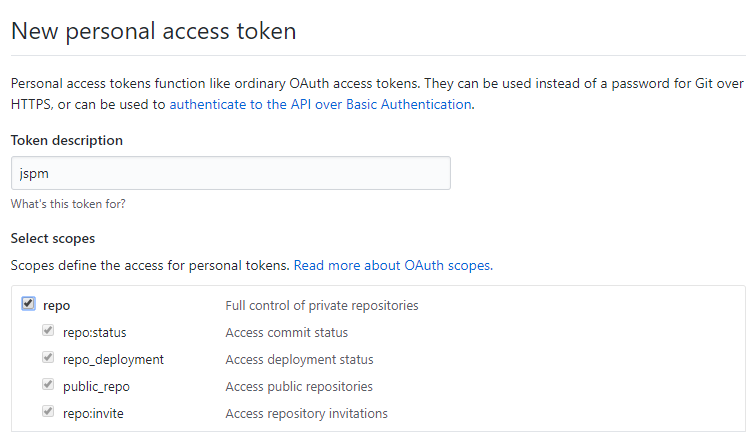
- Copy the token and save it somewhere
- On the frontend folder run
jspm registry config githuband configure it using the token - Next export the registry info
jspm registry export github. We get an output like this:
jspm config registries.github.remote https://github.jspm.io
jspm config registries.github.auth <JSPM_GITHUB_AUTH_TOKEN>
jspm config registries.github.maxRepoSize 100
jspm config registries.github.handler jspm-github- Copy the
and save it in a secret variable (name it something like: JSPM_GITHUB_AUTH_TOKEN) on the project - The you can use the secret variable and use it on the
.gitlab-ci.ymlfile like this:
  - jspm config registries.github.remote https://github.jspm.io
  - jspm config registries.github.auth $JSPM_GITHUB_AUTH_TOKEN
  - jspm config registries.github.maxRepoSize 100
  - jspm config registries.github.handler jspm-github
  - jspm install
Found errors? Think you can improve this documentation? Simply click the Edit link at the top of the page, and then the icon on Github to make your changes.